
–
–
🐧 Voice Commander
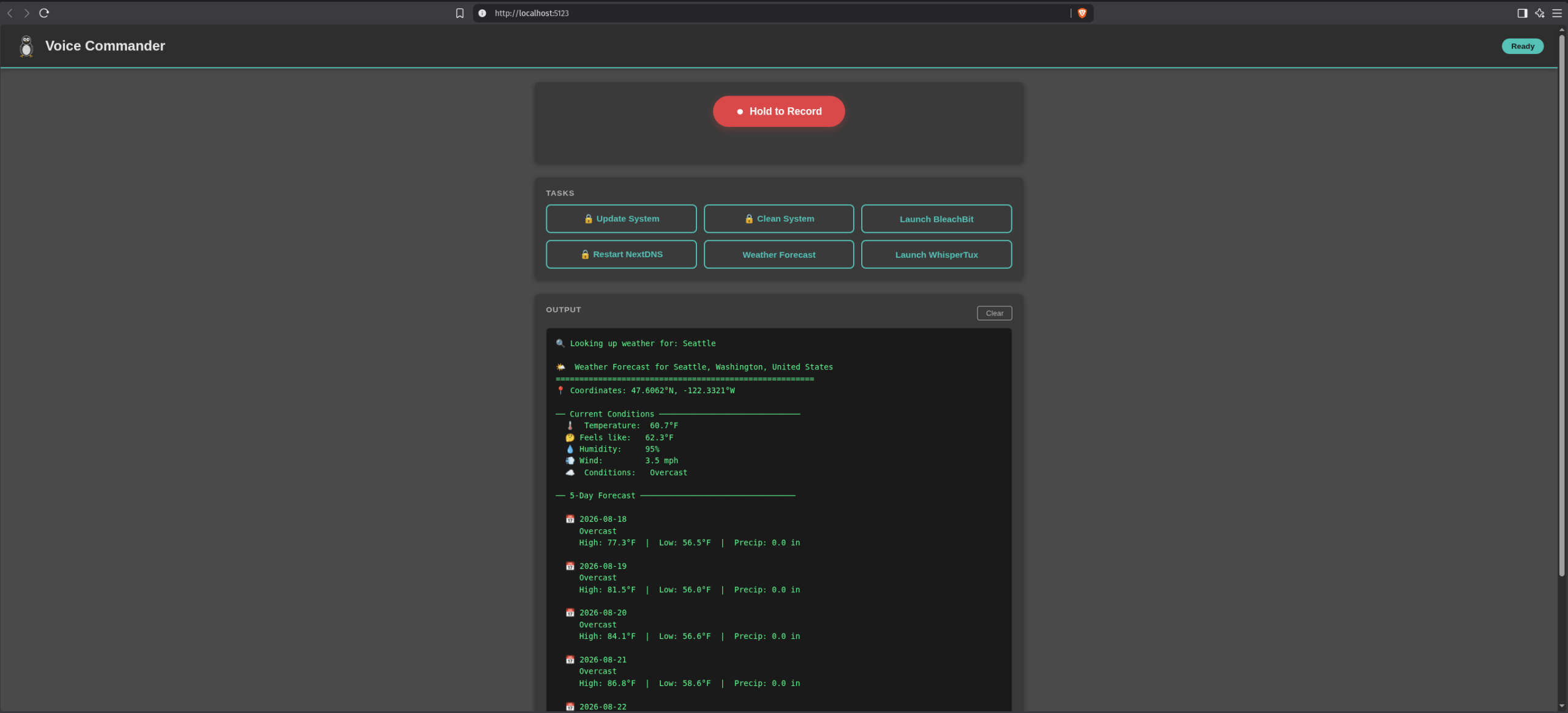
Voice Commander is a local, web-based, voice-controlled task runner for Linux (Pop!_OS / Ubuntu / Debian). It serves a dashboard in your browser with two input methods:
- Buttons — click a task to run it
- Voice — click the red record button, speak a command, and it transcribes, matches, and executes automatically
Everything runs locally. Speech-to-text uses whisper.cpp (via your WhisperTux installation) with no cloud services. Optional weather lookups use the free Open-Meteo API.
Features
- Fully local web UI — served from
http://localhost:5123 - Offline speech-to-text — whisper.cpp with the
base.enmodel (~142MB) - Live command output — streams stdout/stderr to the browser in real time (Server-Sent Events)
- Sudo password popup — enter your password in the browser when a task needs root; it is piped once to
sudo -Sand never stored - Fuzzy voice matching — "update the linux system" and "update system" both work (thefuzz)
- Weather forecasts — voice ("weather in Seattle") or manual city entry; uses Open-Meteo geocoding + forecast APIs
- Extensible — add a new task in
tasks.pywith ~5 lines; a new button appears automatically
How It Works
┌──────────────── Browser ────────────────┐
│  index.html + app.js (frontend)         │
│   • Task buttons                        │
│   • Record button (MediaRecorder API)   │
│   • Live output panel (SSE stream)      │
│   • Sudo / city / confirm modals        │
└───────────────┬─────────────────────────┘
                │ HTTP (POST / fetch) + SSE
┌───────────────▼─────────────────────────┐
│  Flask backend (app.py)                 │
│                                         │
│  /api/execute/<task>  → run task        │
│  /api/transcribe      → STT pipeline    │
│  /api/stream/<exec>   → live output     │
│  /api/tasks           → task list       │
└───────────────┬─────────────────────────┘
                │
    ┌───────────┼───────────────────┐
    │           │                   │
┌───▼───┐  ┌────▼─────┐       ┌─────▼──────┐
│ tasks │  │ whisper  │       │ Open-Meteo │
│ .py   │  │ .cpp     │       │ API (opt.) │
│       │  │ (STT)    │       │ (weather)  │
└───┬───┘  └────┬─────┘       └─────┬──────┘
    │           │                   │
┌───▼───────────▼───────────────────▼──────┐
│  subprocess → shell commands (sudo -S)   │
└──────────────────────────────────────────┘
Stage-by-stage
- Recording —
app.jsuses the browserMediaRecorderAPI to capture mic audio (WebM/Opus) and POSTs it to/api/transcribe. - Conversion — Flask saves the clip, then
ffmpegconverts it to 16kHz mono 16-bit WAV (whisper.cpp's required input format). - Transcription — Flask calls the
whisper-clibinary directly (the one built by WhisperTux) with theggml-base.en.binmodel and captures the text from stdout. - Matching —
find_matching_task()first checks for weather patterns ("weather in X", "forecast for X"), then fuzzy-matches against each task's keyword list usingthefuzz(60% confidence threshold). - Execution — The task's shell command runs via
subprocess.Popen. If it needs sudo and a password was supplied,sudo -Sreads it from stdin. Output is pushed to a queue. - Streaming — A Server-Sent Events endpoint (
/api/stream/<exec_id>) pushes each output line to the browser panel in real time.
File Structure
~/voice-commander/
├── app.py                      # Flask backend — routes, STT pipeline, task execution,
│                               #   weather API integration, SSE streaming
├── tasks.py                    # Task definitions — EDIT THIS to add tasks
├── requirements.txt            # Python dependencies (flask, thefuzz, requests)
├── start.sh                    # Setup + launch script (venv, deps, checks, run)
├── launch-voice-commander.sh   # Desktop-launcher wrapper (starts server, opens browser)
├── README.md                   # This file
├── templates/
│   └── index.html              # Web UI markup (header, record button, task grid,
│                               #   output panel, modals)
└── static/
    ├── style.css               # Styling — medium-gray theme, turquoise task buttons,
    │                           #   bright-red record button, terminal styling
    ├── app.js                  # Frontend logic — recording, fetch calls, SSE,
    │                           #   modal handling, voice command routing
    └── tux.svg                 # Tux penguin logo (header + desktop icon)
Requirements
| Dependency | Purpose | Install |
|---|---|---|
| Python 3.8+ | Runtime | Pre-installed on Pop!_OS |
WhisperTux (~/Downloads/whispertux) | Provides whisper-cli binary + models | git clone + python3 setup.py |
| ffmpeg | Audio conversion (WebM → WAV) | sudo apt install ffmpeg |
| Flask | Web server | Auto via start.sh |
| thefuzz | Fuzzy voice matching | Auto via start.sh |
| requests | Open-Meteo API calls | Auto via start.sh |
| bleachbit (optional) | "Launch BleachBit" button | sudo apt install bleachbit |
Installation
# 1. Install WhisperTux (builds whisper.cpp + downloads models)
cd ~/Downloads
git clone https://github.com/cjams/whispertux
cd whispertux
python3 setup.py

# 2. Verify the model is ~142MB (a 48MB file is corrupted)
ls -lh ~/Downloads/whispertux/whisper.cpp/models/ggml-base.en.bin

# 3. Copy the voice-commander folder onto this machine, then:
cd ~/voice-commander
./start.sh
start.sh creates a venv, installs dependencies, validates whisper-cli/ffmpeg, and starts the server. Open http://localhost:5123.
⚠️ Folder name: keep the project at~/voice-commander(all scripts and this guide assume it). If you copied it as~/Voice Commander(with a space), rename it:mv ~/"Voice Commander" ~/voice-commander
⚠️ Newer WhisperTux GUI bug: recent WhisperTux revisions crash with_tkinter.TclError: unknown option "-bootstyle"becausemain.pyuses plain tkinter'sttkwhile passingbootstyle=(a ttkbootstrap-only option). Voice Commander doesn't use the WhisperTux GUI, but if you launch it manually, patchmain.py:cd ~/Downloads/whispertux sed -i 's/^from tkinter import ttk, messagebox$/from tkinter import messagebox/' main.py sed -i '/^from ttkbootstrap.constants import \*$/a ttk = ttk_style' main.py
Desktop Launcher (Double-Click Icon)
Creates a desktop icon with the Tux penguin that starts the server and opens it in your default browser. Works on any Debian-based system with a GNOME-style desktop (Pop!_OS, Ubuntu, Debian).
Files you're creating
| File | Purpose |
|---|---|
~/.local/share/icons/voice-commander.svg | Tux icon, visible to the system |
~/voice-commander/launch-voice-commander.sh | Wrapper: starts server, waits, opens browser |
~/.local/share/applications/voice-commander.desktop | Launcher registered in the app menu |
~/Desktop/voice-commander.desktop | The desktop shortcut itself |
Deployment
1. Install the Tux icon
mkdir -p ~/.local/share/icons
cp ~/voice-commander/static/tux.svg ~/.local/share/icons/voice-commander.svg
2. Create the launcher wrapper script
The wrapper detects an already-running server (no duplicate instances, no "port in use" errors), starts the server, waits until it actually responds, then opens the browser.
cat > ~/voice-commander/launch-voice-commander.sh << 'EOF'
#!/bin/bash
# Voice Commander launcher: starts server, opens browser, keeps terminal for logs

PROJECT_DIR="$HOME/voice-commander"
URL="http://localhost:5123"
cd "$PROJECT_DIR" || exit 1

# 1) Already running? Just open the browser and bail.
if curl -s -o /dev/null --max-time 2 "$URL"; then
    echo "Voice Commander is already running at $URL"
    xdg-open "$URL" >/dev/null 2>&1 || \
        brave-browser --new-window "$URL" >/dev/null 2>&1 || \
        brave --new-window "$URL" >/dev/null 2>&1 || \
        google-chrome --new-window "$URL" >/dev/null 2>&1 || \
        firefox --new-window "$URL" >/dev/null 2>&1 &
    sleep 2
    exit 0
fi

# 2) Start the server in the background
./start.sh &
SERVER_PID=$!

# 3) Wait until the server responds (max ~15s)
for i in $(seq 1 30); do
    if curl -s -o /dev/null --max-time 1 "$URL"; then
        break
    fi
    sleep 0.5
done

# 4) Open the browser (fallback chain: default → brave → chrome → firefox)
xdg-open "$URL" >/dev/null 2>&1 || \
    brave-browser --new-window "$URL" >/dev/null 2>&1 || \
    brave --new-window "$URL" >/dev/null 2>&1 || \
    google-chrome --new-window "$URL" >/dev/null 2>&1 || \
    firefox --new-window "$URL" >/dev/null 2>&1 &

# 5) Keep the terminal open for logs / Ctrl+C to stop
wait $SERVER_PID
EOF

chmod +x ~/voice-commander/launch-voice-commander.sh
3. Create the desktop entry
⚠️ Use the literal username (e.g./home/pop/...), not$USER— desktop entries don't expand shell variables. TheExec=line must contain no shell metacharacters (&,;,$, quotes) — all logic lives in the wrapper script.
mkdir -p ~/.local/share/applications
U=$(whoami)
cat > ~/.local/share/applications/voice-commander.desktop << EOF
[Desktop Entry]
Type=Application
Name=Voice Commander
Comment=Voice-controlled desktop task runner
Exec=/home/$U/voice-commander/launch-voice-commander.sh
Icon=voice-commander
Terminal=true
Categories=Utility;
StartupNotify=false
EOF

chmod +x ~/.local/share/applications/voice-commander.desktop
4. Drop a copy on the Desktop & refresh
cp ~/.local/share/applications/voice-commander.desktop ~/Desktop/
update-desktop-database ~/.local/share/applications 2>/dev/null
touch ~/.local/share/icons/voice-commander.svg
gtk-update-icon-cache ~/.local/share/icons/ 2>/dev/null
5. Trust & launch
- Double-click Voice Commander on the Desktop.
- First time, Pop!_OS/GNOME shows "Untrusted application launcher" → click Allow Launching (or right-click → Allow Launching).
- A terminal opens, the server starts (🐧 banner), and after ~2–3 seconds the browser opens at
http://localhost:5123.
Also available from the app menu: press Super, type "Voice Commander".
First-run verification
- ☐ Terminal shows the Voice Commander banner (whisper binary + model found)
- ☐ Browser opens
http://localhost:5123automatically - ☐ Page loads with gray background, Tux logo, red Record button, turquoise task buttons
- ☐ Double-clicking the icon again while running → just reopens the browser (no port error)
Customization
Silent background launch (no terminal window): set Terminal=false in both .desktop files, and in the wrapper change step 2 to:
nohup ./start.sh > /tmp/voice-commander.log 2>&1 &
SERVER_PID=$!
Stop the server later with fuser -k 5123/tcp.
Force a different browser: the wrapper tries xdg-open first (system default), then Brave → Chrome → Firefox. Remove unwanted fallbacks, or set your default:
xdg-settings set default-web-browser brave-browser.desktop
Auto-start at login (systemd user service):
mkdir -p ~/.config/systemd/user
cat > ~/.config/systemd/user/voice-commander.service << 'EOF'
[Unit]
Description=Voice Commander web server
After=network.target

[Service]
ExecStart=/home/USERNAME/voice-commander/start.sh
Restart=on-failure
WorkingDirectory=/home/USERNAME/voice-commander

[Install]
WantedBy=default.target
EOF
# Replace USERNAME above, then:
systemctl --user daemon-reload
systemctl --user enable --now voice-commander.service
Launcher troubleshooting
| Symptom | Cause / Fix |
|---|---|
| "Untrusted application launcher" | Normal on first run → click Allow Launching |
| Icon shows as generic gear/blank | Re-run the refresh block; verify ~/.local/share/icons/voice-commander.svg exists |
| Click does nothing / no browser | Rebuild .desktop with literal username in Exec= (no $USER, no &&); confirm wrapper is executable |
| Terminal opens but browser doesn't | Server took >15s to start (first whisper boot). Run ./start.sh manually to see errors, or increase the seq 1 30 wait loop |
| "Port 5123 is already in use" | Previous instance still running → fuser -k 5123/tcp, or let the wrapper detect it and reopen the browser |
| Works from terminal but not from icon | Stale/untrusted .desktop file → re-copy it and Allow Launching again |
Usage
- Run a task by button — click a turquoise task button. Sudo tasks show a 🔒 password popup; destructive tasks show a confirm popup.
- Run a task by voice — click the red Record button, speak, click again to stop. The transcription and matched task appear above the buttons, and the task auto-runs.
Built-in tasks
| Button | Command | Sudo | Confirm |
|---|---|---|---|
| Update System | sudo apt update && sudo apt upgrade -y && flatpak update -y | 🔒 | ⚡ |
| Clean System | sudo apt autoremove -y && sudo apt autoclean | 🔒 | ⚡ |
| Launch BleachBit | setsid bleachbit >/dev/null 2>&1 & | — | — |
| Restart NextDNS | sudo systemctl restart nextdns.service | 🔒 | ⚡ |
| Weather Forecast | Open-Meteo API (city required) | — | — |
| Launch WhisperTux | setsid ~/Downloads/whispertux/whispertux >/dev/null 2>&1 & | — | — |
Weather
- Voice: "weather in Seattle", "forecast for New York", "weather forecast Austin Texas"
- Button: click "Weather Forecast" → type a city ("Seattle" or "Austin, Texas") → Get Weather
- Output prints in the terminal panel: current conditions + 5-day forecast (Fahrenheit, mph, inches).
Adding a New Task
Edit tasks.py and add a dictionary entry. Restart the server; the button appears automatically.
"check_disk": {
    "label": "Check Disk Space",
    "keywords": [
        "check disk",
        "disk space",
        "disk usage",
        "how much space",
    ],
    "command": "df -h",
    "sudo": False,
    "confirm": False,
},
Field reference:
| Field | Type | Description |
|---|---|---|
label | str | Button text in the UI |
keywords | list | Voice phrases that trigger this task (fuzzy-matched) |
command | str | Shell command to execute |
sudo | bool | If True, web UI prompts for a password |
confirm | bool | If True, web UI asks "Run this?" first |
Configuration
| Setting | File / Location |
|---|---|
| Task definitions | tasks.py (top of file) |
| Whisper binary path | app.py → WHISPER_CPP_DIR / WHISPER_BINARY (auto-detect) |
| Whisper model path | app.py → WHISPER_MODEL |
| Server port | app.py → bottom line: port=5123 |
| Output panel height | static/style.css → .terminal { height: ... } |
| Colors / theme | static/style.css → CSS variables in :root |
Troubleshooting
| Problem | Fix |
|---|---|
Port 5123 is already in use | fuser -k 5123/tcp then ./start.sh |
not all tensors loaded from model file | Model is corrupted (48MB). Re-download the ~142MB ggml-base.en.bin |
No module named 'requests' | cd ~/voice-commander && source venv/bin/activate && pip install requests |
EBML header parsing failed / ffmpeg error | Recording was too short. Hold record ≥ 2–3 seconds and speak clearly |
| Voice hears "forecast Seattle" but city not found | Restart after updating app.py — the clean_city_name fix must be live |
| Mic access denied | Browser → allow microphone for localhost:5123 (check site permissions) |
| Whisper slow | Reduce --threads in app.py, or switch to the tiny.en model |
| Blank output panel | Restart server; static file changes don't need restart, but app.py changes do |
unknown option "-bootstyle" (WhisperTux GUI) | Patch main.py (see Installation section above) |
| Server won't start after running with sudo | A root-owned venv//__pycache__/ breaks it. sudo rm -rf venv __pycache__ then run ./start.sh as your user (never sudo) |
Security Notes
- Flask binds to 127.0.0.1 only — nothing is exposed to the network.
- The sudo password is sent over HTTP to localhost, piped once to
sudo -S, and never stored or logged. It is cleared from the JS input immediately. - No HTTPS needed for localhost-only traffic.
- For stricter setups, a NOPASSWD sudoers entry per command is an alternative (not required).
Credits
- whisper.cpp — ggerganov/whisper.cpp
- WhisperTux — cjams/whispertux (provides the built binary/models)
- Open-Meteo — free weather API (open-meteo.com)
- Tux — the classic Linux penguin, drawn as inline SVG
License
MIT — do whatever you like with it. WhisperTux and whisper.cpp retain their own licenses (MIT).